4 min read
WhatsApp link previews: make your shop look premium
A bare URL on WhatsApp reads like spam. How link previews work, why they earn the tap, and how to give every shop and product link a branded card.
Picture a boutique owner on a Sunday evening, sending her new-collection link to forty of her best customers. She's proud of the pieces. But what lands in each chat is a naked blue URL — a string of letters that looks exactly like the lottery-scam forwards those same customers deleted that morning. A few loyal ones tap anyway. Most scroll past. The collection was good; the link didn't dress for the occasion.
Now picture the same message where the link unfurls into a card: a crisp photo of the lead lehenga, its name, the price, and the boutique's name underneath. Nothing else about the message changed — but now it looks like a shop, not a forward.
Why a bare link reads as spam
WhatsApp is a high-trust medium. People open it expecting family, not marketing — which is exactly why a boutique message can work so well there, as the WhatsApp playbook for boutiques argues. But that trust cuts both ways: a bare URL carries zero evidence of what's behind it. Every phone user has been burned by a mystery link, so the default response to one is suspicion. A preview card is the opposite — it shows the destination before the tap. The customer isn't being asked to trust; she's being shown.
This matters double when your link gets forwarded. Your best customer sends your collection to her sister-in-law, who has never heard of you. The preview card is your entire first impression to someone you've never met.
What a link preview actually is
There's no setting inside WhatsApp for this, and no trick in how you send the message. When a link is pasted into a chat, WhatsApp's crawler quietly visits the page and reads a few special tags in its code — a title, a description, and an image — called Open Graph tags. If the page provides them, you get a card. If it doesn't, you get the naked URL. The preview is decided entirely by the website, not by the sender or the app.
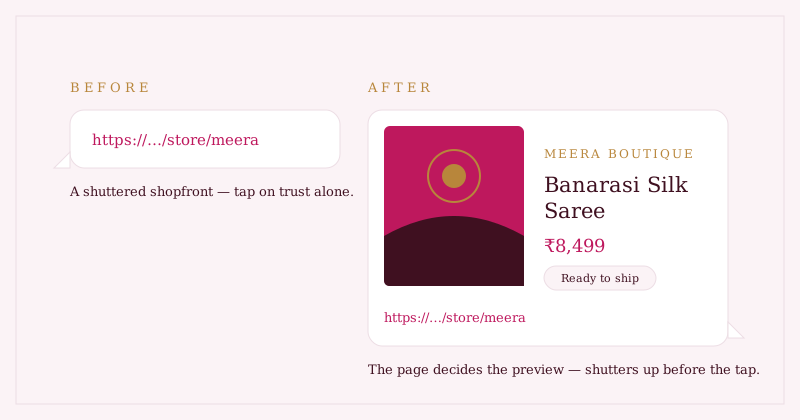
Your link is a shopfront. A bare URL is that shopfront with the shutters down — the customer has to trust there's something good inside. A preview card raises the shutters before she even taps.
Two honest, practical notes, whatever platform your shop runs on. First, test in a real chat — send your own link to yourself; never assume. Second, previews are cached: if you update a product photo and the old card keeps appearing, Meta's free Sharing Debugger tool can re-scrape the page and refresh it.
What makes a preview premium rather than merely present
Not all cards are equal. The ones that earn the tap share a few traits:
- A real product photo, cropped for a small landscape card — not a logo, not a stretched banner. The photo does the selling.
- Name and price visible in the card, so the message is useful even before the tap. "Banarasi silk — ₹8,499" answers the first question.
- The shop's name on every card, building brand memory with each share — the quiet advantage of owning your own shop page, which marketplace, Instagram, or your own website weighs in detail.
- A small, fast image. Crawlers routinely skip multi-megabyte phone photos, which is how a "correct" setup still shows no picture.
Where Studio OS fits
Every Studio OS shop gets this without setup — there is nothing to configure, no tags to learn:
- Product links unfurl into a branded card: product photo on the left; name, price (with any discount shown honestly), ready-to-ship or made-to-order, and your boutique's name on the right.
- Your shop link gets its own card — "Shop the collection" with your newest piece's photo, or your logo while the catalog is still filling up.
- The cards are generated fresh from your real product data — no invented "bestseller" badges, no stale prices.
- Sharing stays fully in your hands: the Share button opens WhatsApp with a message pre-filled, and you press send. Studio OS never messages your customers for you.
Paste the demo shop link into any chat and watch it dress itself. Then give your own shop the same wardrobe at Studio OS — free in early access, no card needed.